
TL;DR
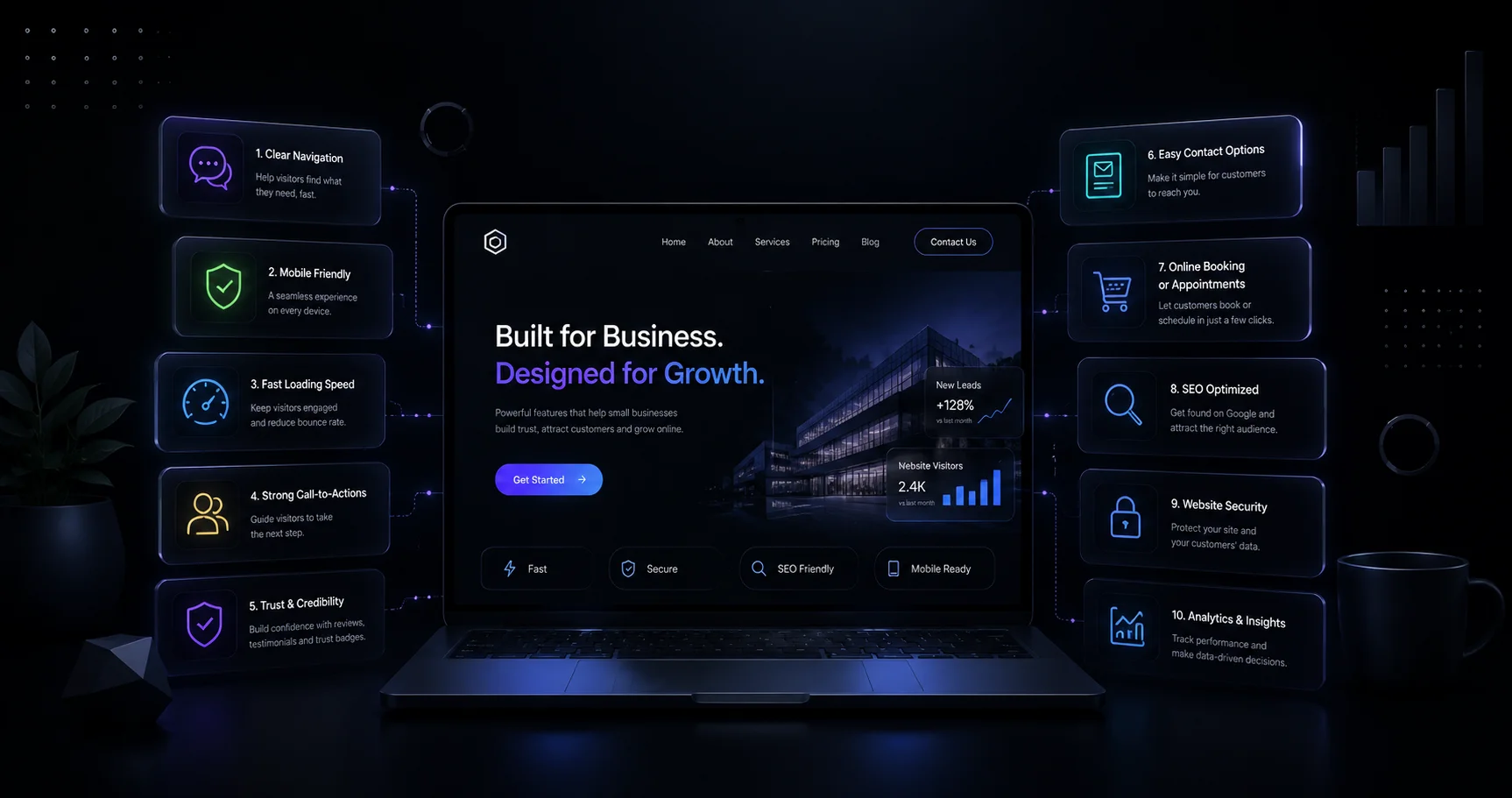
Every small business website needs:
(1) fast, Core Web Vitals-passing performance.
(2) mobile-first responsive design
(3) clear calls-to-action.
(4) SSL/security.
(5) simple navigation.
(6) contact info & click-to-call.
(7) live chat or AI chatbot.
(8) SEO-optimized content and schema markup.
(9) social proof (reviews/testimonials).
(10) analytics/tracking.
Together these turn a site from a digital brochure into a 24/7 sales and trust engine.
A website that loads slowly or buries the phone number costs more than traffic — it costs sales. In 2026, 83% of small businesses now have a website, and buyers judge credibility within seconds of landing on it.
Search has also changed. Shoppers now start research in ChatGPT and Perplexity as often as Google, and AI-search visitors convert at roughly 3.5%, noticeably higher than traditional organic traffic. A website built only for Google rankings is already behind.
This guide breaks down the 10 features every small business website needs in 2026 — ranked by impact, backed by current data, and structured so both human readers and AI engines can extract fast, accurate answers.
Why Do Website Features Matter More in 2026?
Three shifts changed the bar this year:
- AI search visitors now convert higher than organic search visitors, rewarding sites built for both humans and AI crawlers.
- Core Web Vitals and mobile UX are now baked into Google’s ranking signals, not optional extras.
- Buyers judge a business’s legitimacy by its website before they judge its product — a dated or slow site reads as an untrustworthy business.
The 10 Must-Have Features (Ranked by Impact)
1. Fast, Core Web Vitals-Passing Performance
A small business site should load in under 2.5 seconds. Every extra second of load time can reduce conversions by over 4%, and roughly 40% of visitors abandon a page that takes longer than 3 seconds.
- Compress images and use modern formats (WebP/AVIF)
- Choose reliable, fast hosting
- Minimize third-party scripts and heavy plugins
2. Mobile-First, Responsive Design
Mobile now drives over half of global web traffic, and about 50% of users abandon a site that isn’t mobile-friendly. Design for mobile first, then scale up to desktop.
3. Clear, Above-the-Fold Calls-to-Action (CTAs)
Every page needs one obvious next step — “Call Now,” “Book a Free Quote,” or “Get Started” — placed above the fold and repeated at natural decision points down the page.
4. SSL Security & HTTPS
HTTPS is non-negotiable — browsers flag non-secure sites, Google treats it as a ranking signal, and visitors bounce instantly from a “Not Secure” warning.
5. Simple, Intuitive Navigation
Visitors should reach any core page — Services, About, Contact — within two clicks. Keep the main menu to 5–7 items and mirror that structure in the footer.
Also Read: 10 Best Website Design Examples in 2026 (Ranked & Analyzed)
6. Visible Contact Info & Click-to-Call
Phone number, email, address, and hours should appear in the header or footer of every page, with a tap-to-call button on mobile — this is one of the top trust and conversion signals for local businesses.
7. Live Chat or AI Chatbot
A chat widget captures visitors who won’t fill out a form or wait for a callback. In 2026, AI-powered chat can qualify leads, answer FAQs, and book appointments outside business hours.
8. SEO-Optimized Content & Schema Markup
Every page needs a unique title tag, meta description, one H1, and structured data (Organization, LocalBusiness, FAQ, Review schema) so both Google and AI engines can accurately read and cite the page.
9. Social Proof: Reviews & Testimonials
81% of shoppers research online before buying, and reviews are the fastest way to answer “can I trust this business?” Embed live Google reviews, not just static quotes.
10. Analytics & Conversion Tracking
Without analytics, feature decisions are guesses. Track traffic sources, form submissions, and click-to-call events to see which features actually drive revenue.
Want a site like these on your list?
If you’re starting fresh, talk to Ezee Growth about your website goals. Already have a website? Get a free audit and we’ll send your results within 24 hours.
Feature Comparison: Impact vs. Effort to Implement
| Feature | Conversion Impact | Effort to Add |
|---|---|---|
| Page speed / Core Web Vitals | High | Medium |
| Mobile-first design | High | Medium–High |
| Clear CTAs | High | Low |
| SSL / HTTPS | High (trust) | Low |
| Simple navigation | Medium | Low |
| Visible contact info | High (local) | Low |
| Live chat / AI chatbot | Medium–High | Medium |
| SEO + schema markup | High (long-term) | Medium |
| Reviews & testimonials | High (trust) | Low |
| Analytics & tracking | Enables all others | Low |
How to Audit Your Website in 5 Steps
- Run a Core Web Vitals test (Google PageSpeed Insights) and fix anything under a “Good” score.
- Open the site on a phone and time how long it takes to find the phone number.
- Check every page for one clear CTA above the fold.
- Confirm the padlock/HTTPS icon shows on every page, including forms.
- Add or verify schema markup using Google’s Rich Results Test.
Best Way to Prioritize Fixes on a Limited Budget
Start with the zero-cost, high-impact items first: visible contact info, one strong CTA per page, and HTTPS. Then invest in page speed and mobile design, since both directly affect Google rankings and AI-search visibility.
Examples of Small Business Websites Doing This Well
- A local HVAC company with a sticky “Call Now” button and live availability chat
- A boutique law firm using embedded Google reviews on every service page
- A regional bakery with schema-marked menu items appearing in AI-generated answers
Difference Between a “Good” Website and a “Converting” Website
A good-looking website satisfies the eye. A converting website satisfies intent — it loads fast, answers the visitor’s question in seconds, and makes the next step obvious. Design without conversion architecture is decoration, not infrastructure.
Conclusion
A small business website in 2026 is judged in seconds, by humans and AI systems alike. The ten features above aren’t a wish list — they’re the baseline that separates a site that generates leads from one that quietly loses them.
Start with the audit, fix the zero-cost items first, and treat the website as what it actually is: the hardest-working, lowest-cost salesperson the business has.
Frequently Asked Questions
What is the most important feature of a small business website?
Page speed and mobile usability, because both gate everything else — a visitor who leaves in the first three seconds never sees the rest of the site.
How many pages does a small business website need?
Most effective small business sites run 5–10 pages: Home, About, Services, Contact, and dedicated pages per core offer.
Do small businesses need a chatbot in 2026?
It’s increasingly expected — an AI chatbot captures after-hours leads and answers routine questions instantly, without added staff time.
What is schema markup and why does it matter?
Schema markup is structured code that tells search engines and AI models exactly what a page means — it’s how a business appears in rich results and AI-generated answers.
How much should a small business spend on a website in 2026?
Costs range from under $100/year on a DIY builder to $10,000+ for a custom-built site; most small businesses land between $500 and $5,000 including first-year hosting.